Showing posts with label one. Show all posts
Showing posts with label one. Show all posts
Monday, November 17, 2014
Auto Sound Systems One Piece at a Time
Those who are in the market for auto sound systems are probably well aware of the many decisions that need to be made throughout the process. Gone are the days when you went in, pointed to a box and walked out with all the pieces, parts, and components you would ever need for a really kickin sound. The truth of the matter is that there are many pieces and parts that work together in order to create the ultimate sound system and everyone seems to have different requirements, styles, tastes, and budgets to work with.
Because of this, many manufacturers of auto sound systems have wised up to the fact that some people will buy the components they need to create the sound system of their dreams piece by piece as budgets allow. This is actually a very intelligent way for customers on a budget to buy the sound system they are hoping to some day have. As a result you will find that speakers, amplifiers, sub woofers, and the actual stereo are often sold separately and at very reasonable prices.Most of us hate living within limited budgets but understand that often in life it is a necessary evil. Living on a budget is not such a terrible thing really. If we had everything we wanted, what on earth would there be to look forward to? At least that is what I keep telling myself. I, however, seem to be the queen of budget living and bargain hunting. I love little more in life than finding a great deal on an item Ive had my eye on for quite a while and hate little more than finding it cheaper once Ive purchased it. As such, I tend to invest a great deal of time researching any major purchase before taking the plunge. A good auto sound system by this I mean good quality, minimal features is going to run (total package and installation) at least $1,000 with many costing a good deal more than that.
That doesnt mean you need to have a thousand bucks lying around the house in order to begin building your auto sound system. You can buy a decent set of speakers for around $200-$260 if you desire. You can find sets at lower prices, but this is the price for a fairly decent set of speakers that should serve you well. Keep in mind that you could very easily spend a lot more than this on speakers if you arent careful. Living on a budget means you have to make some sacrifices along the way in order to have the things you want in life. Buy the speakers and have them installed (if you can do it or your know someone who can, this will save a lot of time and money).
Once you have the first component, whichever one that may be (that choice is entirely up to you and largely dependent on your personal tastes and which need replacing worse in the vehicle you own) you can begin saving towards the next. You should also consider asking friends and family (who would like to know what to get you for the holidays) to help you reach your smaller goals along the way. Most people are glad to help with specific items if they know what those items are. The point is that this isnt an all or nothing proposition. Take small steps towards your prize and you will find that you are constantly getting one step closer.

Wednesday, November 12, 2014
HTCs The All New One will connect you to Verizons 4G speeds

A while back we saw the same phone from the above picture leaking out from the very same evleakss watermark from Twitter, but now on for a different carrier around the United States shores. The codenamed M8 or so called The All New One from High Tech Computer corporation will not only come on AT&Ts connections, but also on Americas Big Red, Verizon Wireless.
The handset appears in Black matte color option, sporting the Statesides Verizon Wireless branding on the lower bottom of the phones back side along with the 4G LTE stamp. We will only have to wait for more 25 days to know what the Taiwanese, HTCs official news will be like.
Source: evleaks (Twitter)
Tuesday, November 11, 2014
HTC One 2014 or M8 is offered in 24 carat Gold T Mobiles CEO has got One!

Our social media friendly Chief Executive Officer in town, John Legere from T-Mobile has posted out an eye-catching tweet on his official Twitter account, this past Friday. From the tweet he unveiled and introduced the Goldfinger, the HTCs 2014 flagship handset coated in real 24 carat Gold.
The previous year, we saw the Taiwanese company doing exactly the same, with their 2013 front runner Android smartphone, the One in five Limited Edition 18 carat Gold variants, that debuted at United Kingdoms 18th Anniversary of Music Of Black Origin Awards. As of last years, this year too the phone hasnt changed from its internals, but will come in the new dress of the 24 carat Gold glazing from out. Well let us remember you folks, the HTC One 2014 also comes in an anodized Amber Gold color option, if you find affording this really minds your pockets.
"Just call me #goldfinger! Check out the 24kt #HTCOneM8 the peeps at @HTCUSA sent me! This thing is awesome! #HTCOneUp," said John Legere, CEO of T-Mobile US, Inc. on Twitter.
Source: John Legere (Twitter)
Monday, October 13, 2014
The HTC Mini One updated to Android 4 3 Jelly Bean
Last October, specifically the 24th, the HTC One received its update to Android 4.3 firmware corresponding Jelly Bean, the last version before the arrival of Android KitKat . Having spent little time since then, now he s the turn of the same to his little brother, the HTC Mini One . Recall that the HTC One, meanwhile receive the upgrade to Android KitKat throughout the month of January 2014.Fue who initiated this new Samsung smartphone segment with the name " mini" . Users tend to believe that , with respect to the "original" device, only vary in size, something that really is not true, since the "mini" incorporate a completely different such "original" smartphone hardware. Without further ado, we focus squarely on the update to Android 4.3 Jelly Bean HTC One mini .
The HTC Mini One is also updated to Android 4.3 Jelly Bean
Surprisingly, while some other high-end manufacturers have yet to upgrade to Android 4.3 Jelly Bean, HTC has bumped the table and has launched its software update for this smartphone range corresponding to the average of the current catalog telephony mobile . Along with an updated version of Google s mobile operating system , Android, come other new software features such as the 5.5 version of Sense , HTC s own interface , and with it , the ability to disable the singular BlinkFeed .
All details of the upgrade to Android 4.3 Jelly Bean Mini HTC One
The history of an upgrade is the list itself changes , along with new software, are introduced. This listing will be able to change it in the following Lcdshot accompanying this publication. In it you can see reflected the issues we cited above and some other minor .
Read More..
The HTC Mini One is also updated to Android 4.3 Jelly Bean
Surprisingly, while some other high-end manufacturers have yet to upgrade to Android 4.3 Jelly Bean, HTC has bumped the table and has launched its software update for this smartphone range corresponding to the average of the current catalog telephony mobile . Along with an updated version of Google s mobile operating system , Android, come other new software features such as the 5.5 version of Sense , HTC s own interface , and with it , the ability to disable the singular BlinkFeed .
All details of the upgrade to Android 4.3 Jelly Bean Mini HTC One
The history of an upgrade is the list itself changes , along with new software, are introduced. This listing will be able to change it in the following Lcdshot accompanying this publication. In it you can see reflected the issues we cited above and some other minor .
Tuesday, September 30, 2014
How to Turn On Off Wi Fi on Alcatel One Touch 993D
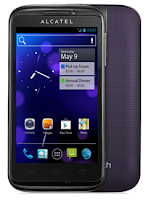
Follow these steps on how to connect to your wireless network:
• On your Home Lcd, tap on the Menu key.
• Select on Settings.
• You will see a Wi-Fi option, beside on the Wi-Fi, just switch whether on/off.
• Tap on Wi-Fi, there should a detailed information of detected wireless networks.
• Tap on the network you want to connect with.
• If the network is secured with a password, make sure to enter the password correctly.
• Then tap Save.
How to Setup an Email Account on Alcatel One Touch 993D
How to setup your an email, follow these steps:
• On your HomeLcd, touch on the Application tab.
• There should an email wizard that will guide you through process in setting up an email.
• Enter the email address and password of the account you want to set-up.
• Then tap Next. (You will be prompted to go to email account settings to enter settings manually, if the account is not provided by your service provider.)
• You can also tap on Manual setup to directly enter the incoming and outgoing settings for the email account you are setting up.
• Enter your preferred account name and display name in outgoing emails.
• If you want to add another email account, just tap on Menu key > Settings > Add Account on the right of the title to create.
Monday, September 29, 2014
How to Backup and Factory Reset Alcatel One Touch 993D
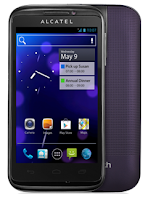
Luckily in Alcatel One Touch 993D you can backup your phone settings and other application data to Google Servers before wiping all the data on your phone. But if you want to erase all the content on your phone, then there’s no need for you to backup your data.
How to Activate the Backup Function:
• Tap on the Menu key from Home Lcd.
• Select Settings > Backup & reset > Back up my data.
• Then mark the checkbox.
How to Factory Reset:
• Tap on the Menu key from Home Lcd.
• Select Settings > Backup & reset > Factory data reset.
• Then mark the checkbox.
If you are unable to turn on your Alcatel One Touch 993D, then you may need to do the hard reset. Press and hold the Volume up key and the Power key at the same time until the Lcd light up. This process will also factory reset your device.
How to Extend Battery Life of HTC One Evo 3D
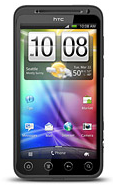
Battery Life depends on how you use your device. For HTC One Evo 3D device, if you want to save your battery to last longer hours, you may need to adjust your settings. Follow these suggestions:
• Turn on the power-saving option on the device. Then lessen the Lcd brightness and the Lcd lock timeout.
1. On your Home Lcd, press the Three Horizontal Line icon.
2. Select Settings, and.tap Power.
3. Choose the Enable power saver check box.
4. Tap to turn power saver on.
5. Tap Power saver settings, and then set and select the behavior when HTC EVO
3D switches to power saving mode.
• Turn down your device volume with the volume keys.
• Close any apps or features when you are done using it so they will not continuously running in the background.
• Turn off the network connection if you are out of range so that your device will stop searching for a network signal.
• You should use the latest version of the software update. Software updates improves some features and fixes some bugs on the previous software version.
• Turn off the camera flash.
• The camera viewfinder can be a power drain, so after youve finished taking photos.
• Turn on the power-saving option on the device. Then lessen the Lcd brightness and the Lcd lock timeout.
1. On your Home Lcd, press the Three Horizontal Line icon.
2. Select Settings, and.tap Power.
3. Choose the Enable power saver check box.
4. Tap to turn power saver on.
5. Tap Power saver settings, and then set and select the behavior when HTC EVO
3D switches to power saving mode.
• Turn down your device volume with the volume keys.
• Close any apps or features when you are done using it so they will not continuously running in the background.
• Turn off the network connection if you are out of range so that your device will stop searching for a network signal.
• You should use the latest version of the software update. Software updates improves some features and fixes some bugs on the previous software version.
• Turn off the camera flash.
• The camera viewfinder can be a power drain, so after youve finished taking photos.
Sunday, September 28, 2014
How to Factory Reset Hard Reset HTC One Evo 3D
Resetting HTC One Evo 3D on Settings:
- Slide the Notifications panel open, and then tap the Gear Icon or Settings.
- Select SD & Phone storage.
- Tap Factory data reset.
- If you want to delete all your files, then tap Erase everything.
These steps is also helpful when your HTC One Evo 3D is unresponsive or frozen and theres no way to access the settings.
- First, press and hold the Volume Down button, and then do the same way on the Power button.
- Hold the two buttons until the three Android images appear on the Lcd.
- Release the button when the three Android images appear and press Volume Down.
- Tap on Factory Reset, and then press the Power Button to confirm.
Tuesday, September 9, 2014
How to add music to htc one x from computer
Music is an important thing for many people. Because music can be entertaining and a lot of benefits, such as therapies to treat stress.
Of course the music is very enjoyable. What else on the device that you are carrying. How to get music on the HTC one X can be from anywhere, one of the added via computer. Before add music files from your computer to your HTC device to first prepare music files.
Here are steps to add music to your HTC device:
Read More..
Of course the music is very enjoyable. What else on the device that you are carrying. How to get music on the HTC one X can be from anywhere, one of the added via computer. Before add music files from your computer to your HTC device to first prepare music files.
Here are steps to add music to your HTC device:
- Plug the supplied USB cable to the port and connect your smartphone to the computer.
- In your computer will see your drive smartphone.
- Copy music files that you have prepared earlier to drive smartphone.
- Once the copy process is complete, disconnect your HTC drive.
- Unplug the USB cable and try to play your favorite music.
Friday, September 5, 2014
HTC One GSM or LTE

HTC One is a new flagship device from HTC for 2013. With no doubts it is a great device with top hardware and innovating software. I will make a review of One soon, so expect a lot of pictures and in-depth comparison of HTC Sense 4+ and brand new HTC Sense 5.
For now some of you might be wondering about possible variants of this device. I made some research and I think I know how would this work. It is not officially confirmed, however I believe it is quite reliable and trustworthy.
Apart of all carriers branded models (also U.S. AT&T, U.S. Verizon and U.S. Sprint), there will be GSM and GSM + LTE variants available for most countries. Respectively M7_U for GSM and M7_UL for LTE. Now the question is - when new update will come for U, will it come for UL the same day, or maybe week later? I cant answer that, but I hope both variants will be updated at the same time.
First off all, looking at HTC One software, its easy to spot that both U and UL variants have the same code-name "m7". Model ID (MID) will be probably slightly different. LTE variant has PN0710000, while GSM should have something like PN0711000 or PN0710001. The beginning of the code will be the same for all One variants - PN07.
Now, lets assume we speak about European version (to avoid confusion with different CIDs or MIDs). It is said that Snapdragon 600 (HTC One SoC) has LTE modem already integrated (just like S4 and S4 Pro). So logically, there shouldnt be 2 different variants of S600 (with or without LTE). And so I believe that. This means that GSM variant of HTC One will have LTE modem as well, but most probably it will be disabled. Is it possible to disable LTE modem? Sure. The fact that specific SoC has LTE modem doesnt mean its activated.
Will it be possible to activate LTE radio in GSM model? Im not sure yet, but I think it would. How? Youll need S-OFF device, thats obvious. Since both GSM and LTE models will have the same hardware, having S-OFF you should be able to flash M7_UL software (RUU.exe). Of course youll have to modify your Model ID (MID) in fastboot before (fastboot oem writemid PN0710000). Is there a risk to totally brick your device? Yes! So dont try it before it is confirmed to be working.
To find any official confirmation of my research I visited Qualcomm site and went to the specification page of new Snapdragons 200, 400, 600 and 800 chipsets. Here is the picture of S600 features:

As you can see, LTE modem is indeed integrated, and so will be present in GSM models as well. Here I repeat again - it will be disabled on GSM units and it wont be possible to switch it on/off in settings just like that. Enabling LTE on such units will be either not possible at all, or it will be possible by flashing M7_UL RUU to S-OFF device. Why this does not apply to HTC One X and its LTE brother, HTC One XL? Because One X is based on quad-core nVidia Tegra 3, while One XL is powered by dual-core Qualcomm Snapdragon S4. Yes, both are running different SoCs, because Tegra 3 doesnt have LTE modem integrated.
How to recognize if HTC One is GSM or LTE version? Looking back at some HTC devices like HTC One SV (C525u) you could noticed "4G LTE" text on the back cover. I wouldnt expect similar text this time, because the back case is not removable.
Do you already own LTE version of HTC One? Consider flashing my custom ROM from this site.
Thursday, August 28, 2014
HTC One X Plus vs LG Nexus 4
Compare HTC One X Plus vs LG Nexus 4 - LG Nexus 4 and HTC One X + are both Android superphone that comes with specifications gahar. Which one would you choose out of the two?
LG Nexus 4 and HTC One X + are both present using Jelly Bean Android OS, but LG Nexus 4 is using a version of Android 4.2 Jelly Bean newer. While HTC One X + is still using Android 4.1.1 Jelly Bean.
LG Nexus 4 and HTC One X + both have a touch screen measuring 4.7 inches. However, the screen resolution of LG Nexus 4 slightly higher at 768 x 1280 pixels with a pixel density of 318ppi. While HTC One X + screen has a resolution of 720 x 1280 pixels with a pixel density of 312ppi. LG Nexus 4 using True HD IPS touchscreen Plus, while HTC One X + using Super LCD touch screen. Both smartphone screen is coated with Corning Gorilla Glass 2.
 |
| Google Images |
For performance, the LG Nexus 4 is powered by the Qualcomm APQ8064 Snapdragon chip with a 1.5GHz quad-core processor dkungan Krait and Adreno 320 GPU, plus 2GB of RAM. While HTC One X + ditenagi with NVIDIA Tegra 3 chip with support for quad-core 1.7GHz processor and ULP GeForce GPU 2, plus 1GB of RAM.
HTC One X + has an internal memory capacity is much larger than the LG Nexus 4. HTC One X + has an internal memory capacity of 64GB, while the LG Nexus 4 only has 16GB of internal memory. Both are not equipped with an external memory slot.
LG Nexus 4 and HTC One X + both equipped with an 8 megapixel autofocus camera, both of which have the ability to record 1080p HD video. Both come equipped with a front camera, LG Nexus 4 comes with a 1.3 megapixel camera, and HTC One X + is equipped with a 1.6 megapixel camera.
LG Nexus 4 and HTC One X + both use a micro SIM. For connectivity features both equipped with features such as 3G HSDPA / HSUPA, Bluetooth 4.0, NFC, GPS, and microUSB port.
And for power, the two smartphones are equipped with a battery capacity of 2100mAh.
LG Nexus 4 is suitable for you who are looking for an Android smartphone with the latest version, and will often get the latest Android updates plus a cheaper price. And this smartphone also offers 2GB of RAM ie.
HTC One X + is suitable for you who are looking for a smartphone with an internal memory capacity of the super relieved (64GB).
 |
| Google Images |
LG Nexus 4 is the result of a collaboration between Google and LG. LG Nexus 4 comes with a touch screen measuring True HD IPS + 4.7 inches with a resolution of 1280 x 768 pixels, and is coated with Corning Gorilla Glass 2. LG Nexus 4 is powered with a processor Qualcomm Snapdragon S4 Pro 1.5GHz quad-core processor and comes with 2GB of RAM.
LG Nexus 4 is equipped with wireless charging capability, and is equipped with other specifications such as the 8-megapixel main camera, 1.3 megapixel front camera, HSPA +, NFC and 2100mAh capacity battery.
LG Nexus 4 using OS Android 4.2 Jelly Bean the latest, and is available in two versions 8GB and 16GB.
 |
| Google Images |
HTC One X + is a smartphone that uses the Android OS 4.1 comes Jelly Bean is powered by a quad-core 1.7GHz processor and 1GB of RAM. HTC One X + uses a touch screen measuring 4.7 inches Super LCD2 with a resolution of 720 x 1280 pixels (312ppi).
HTC One X + is also equipped with 32GB/64GB internal memory, an 8 megapixel camera with 1080p HD video recording capabilities, 1.6 megapixel front camera with 720p HD video recording capabilities, dual-band Wi-Fi, HSDPA and HSUPA, Bluetooth 4.0, GPS, and battery capacity of 2100mAh.
Subscribe to:
Posts (Atom)