Showing posts with label an. Show all posts
Showing posts with label an. Show all posts
Monday, November 3, 2014
Improve Your Online Content With An Easy To Follow Structure
Beginning, Middle, End
Writing quality online content for your websites can be hard and somehow it often seems impossible to make it sound right.
But dont despair! There is a simple structure you can follow to make your copy read better and easier for your visitors.
The Big Three:
In essence, giving your online copy a simple structure can set you on your way to content heaven. This is easy to use and provides great results for minimal fuss.- Introduction
- Main Content
- Conclusion
Is that all there is to writing?
Unfortunately, no. Writing is a craft that requires multiple skills to achieve professional results. It can take writers years to learn how to write to a high standard, and there are no shortcuts. However, this simple structure ensures you will be on the right track.What should I write about?
Basically, anything you feel your customers/readers would be interested to read related to your business or area of expertise. Ideas are hard to come by and require hard work to discover the ideas that will be shareable and original.And thats the key. Make your online content unique and original. After all, would you want to read about what you have read a thousand times before? Probably not. The same is for your readers. Keep things topical, current and intriguing.
Whatever you choose to write about, keeping it within the boundaries of a structure will ensure you keep your writing tight, progressive and it will have a purpose.The big three is a proven method to quickly improve your content with minimal effort.

Tuesday, September 30, 2014
How to Setup an Email Account on Alcatel One Touch 993D
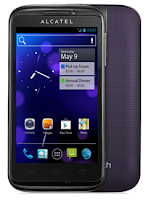
How to setup your an email, follow these steps:
• On your HomeLcd, touch on the Application tab.
• There should an email wizard that will guide you through process in setting up an email.
• Enter the email address and password of the account you want to set-up.
• Then tap Next. (You will be prompted to go to email account settings to enter settings manually, if the account is not provided by your service provider.)
• You can also tap on Manual setup to directly enter the incoming and outgoing settings for the email account you are setting up.
• Enter your preferred account name and display name in outgoing emails.
• If you want to add another email account, just tap on Menu key > Settings > Add Account on the right of the title to create.
Subscribe to:
Posts (Atom)