Showing posts with label 8. Show all posts
Showing posts with label 8. Show all posts
Tuesday, November 11, 2014
iOS 7 vs Android Jelly Bean vs Windows Phone 8 vs BB10
The battle for dominance of the smartphone world is one that has been raging for a few years. With the migration of consumers from feature phones to modern wonders such as the iPhone 5 and the HTC One, or even the cheap as chips offerings like the Nokia Lumia 520 or Huawei Ascend G330, it is clear where the money, and the future lies.

Weve seen some impressive hardware come and go, quad-cores grace most flagship devices (i.e. Sony Xperia Z or HTC One) and there is even the quad/octa core that sits inside the Samsung Galaxy S4, dependent on your location.
Needless to say, all the big guns in the tech industry have some level of input into the mobile OS world. Apple has iOS (just about to reach iOS 7), Google has Android, the most recent version being 4.2 Jelly Bean, Microsoft has Windows Phone 8, leaving BlackBerry with its hopes pinned on BB10.
Users familiar with previous iOS versions may be in for a bit of a shock, with elements such as the lock screen taking a new look. Elements now seem more rounded, and much brighter than before. On the face of it, things seem very different with iOS 7, but the real changes go deeper.
Android is currently sitting at version 4.2, which is another iteration of the popular Jelly Bean OS. Jelly Bean built upon the work done by 4.0 Ice Cream Sandwich, with everything being much smoother with Project Butter, and the introduction of Google Now.
Pretty much every OEM has placed a skin over the top of Android, take a look at HTCs Sense, Samsungs Touchwiz or Huaweis Emotion UI.
That said, nigh on every version builds on the use of multiple home screens populated with widgets, and apps being kept tidy in a drawer.
Microsofts offering bases itself around a system of LiveTiles. These are used in a similar way to widgets on Android, providing information at a quick glance. Users of Windows Phone 7, or Windows 8 on tablets or desktops will feel right at home.
In terms of user customisation, much like iOS, Windows Phone 8 is relatively closed. Live Tiles can be resized, so that more important tiles can take up more screen real estate, and the tile colour can be any of 20 variations. It is also possible to change the lock screen, to bring up photos, or widgets and notifications.
Out of Canada comes BB10, with BlackBerry pinning pretty much all its hopes on the OS. In a similar way to Windows Phone 8, BB 10 allows 8 Active Frames, of which only 4 are visible at one time.
These show the most recent apps used, as well as any information that app may offer, be it weather or calendar events.
Being a totally different OS to prior BlackBerry OS iterations, BB10 is at first a little confusing to use.
Closing apps by running your finger up from the bottom of the screen feeling a little unnatural.
The BlackBerry 10 lock screen comes complete with notifications, calendar events and ability to quick launch the camera.
iOS 7 brings in a raft of changes to the camera app. There isnt a whole load of changes deep down, these being limited more to photo effects; varying lens shapes and live photo filters giving you the Instagram look, without having to use the app. Elsewhere, the interface has become more swipe-friendly.
The Gallery app has also had a few tweaks, meaning that photos are arranged by location, being titled moments. Pinching to zoom will re-draw your library, highlighting days out or holidays. Pinching further shows an overview of the years photos, complete with location tags.
Androids camera app is one that gets a lick of paint with each UI that is placed over the top. Also, with the incredible variation in Android devices, each camera is different, the HTC One being most notable for camera tech with UltraPixel and HTC Zoe, or there is Samsung with Burst Mode found on the Galaxy S3 or S4.
That said, there is an underlying theme that graces Androids camera and gallery app. Photo filters are common place, even the basic Android devices offer Sepia, Monochrome and Negative effects. Gallery apps are a little more varied, however most can pull down images from the cloud, from Picasa/Google+ web albums, with some going so far as Facebook albums too.
Being a unified OS across all devices, Windows Phone 8 camera settings are common. Pinch to zoom has been brought in, and the ability to take photos by tapping the screen making the app feel a little more natural. There is also the idea of lenses, that allow you to use camera tools that you have downloaded, rather than via a separate app.
BlackBerry was keen to show off their camera at the BB10 launch. The reason for this is something that the Canadians are terming Time Shift. This is a nifty piece of tech that, if selected, allows you to go back in time to find the perfect smile. It even works on multiple faces, however needs good lighting.
BB10s other features include standard scene and shooting modes, as well as the ability to use the volume keys as a shutter button.
iOS 7 now incorporates your iCloud stored media, allowing you to see all your tracks in one place, with a wall of album art in Landscape mode adding a nice look to things.
The biggest revolution it brings is iTunes Radio, Apples much rumoured and talked about music streaming service, previously dubbed iRadio. We are unable to comment on the exact release, with availability confirmed for this fall in the US, with the rest of the world left waiting for news. We can say that there will be both a free (ad-funded) and premium service, though.
As for apps, Apples App Store is by far the most famous of all app stores/markets across all OS. iOS7 brings in some updates, such as being able to search for apps based on age range, or the Apps near me feature, which shows you the most popular apps in your location. Apps can also update in the background.
Storing all this media, and all your apps is done in true Apple fashion, with varying sizes of internal storage available. MicroSD is still unsupported, although we never expected, nor ever expect that to change.
Playing catch up in the media department, Google has launched its Play Books, Play Magazines, Play Movies and Play Music apps. Whilst nowhere near as popular as the iTunes version, media downloading is now a lot easier on Android devices.
Downloading apps is also very easy, as Googles rebranded Play Store has become a very attractive and very functional marketplace, with different sections and lists of apps for you to peruse. Auto updating is available, and disable-able too.
The Windows Phone 8 and BlackBerry app stores are far less populated in comparison to both the Google and Apple offerings, although we would be doing them a disservice by calling their offerings sparse (BB10 has 120,000 apps compared to iOS 900,000), especially given that the Microsoft OS has Xbox compatibility.
Since Android 2.2 Froyo, apps to microSD has been a standard feature, alongside its long supported media storage feature. App installation on microSD is also supported via Windows Phone 8, with standard microSD support also being available in BB10.
NFC wasnt something that wasnt explicitly mentioned with the launch of iOS7. Until now, previous iOS devices havent come with NFC chips. We could look into this and say things about upcoming iOS touting devices, such as the unlikelihood of NFC inclusion, with the claim that theres No need to wander around the room bumping your phone with others. That said, apps will be able to share information via Airdrop, provided that it supports Share Sheet.
Android has supported NFC for a while. Android Beam has been used on devices to share data since Android 4.0 Ice Cream Sandwich. Certain manufacturers have taken it a little further, with Samsung adding its S title to create S Beam. Googles wallet application is also likely to make use of NFC as mobile payment becomes increasingly popular.
Windows Phone 8 also packs in NFC support, with its very own Microsoft Wallet app to rival Googles version, and BlackBerry has long had NFC in its handsets so its no surprise BB10 also makes use of the technology.
iOS 7 makes a big deal out of both notifications and Control. The notifications centre that was accessed by swiping down from the top has become a full-screen affair, also available via the lock screen.
The Control Centre is where the real innovation lies, however. Previous iOS versions had a very basic centre, however now quick settings such as Wi-Fi and Bluetooth can be enabled or disabled, as well as controlling screen brightness, music being played, and access to AirDrop and AirPlay controls.
Android has had its notifications bar longer than Apple, so it has come on in leaps and bounds. Jelly Bean also brings in expandable notifications, showing more information about the top event, as well as being able to swipe to dismiss.
Many custom UIs include access to the quick settings (Touchwiz has gotten this nigh on perfect) in the notifications bar. Android also include a Power Control widget that can be placed on home screens, giving quick access to a lot of important settings.
Notifications arent something that ever made it over to Windows Phone 8, however there are strong suggestions that there is a notifications centre making it over in Windows Phone 8.1. Notifications are viewable from the lock screen.
With BB10, there is a dedicated Notifications hub, accessed by swiping from the left hand side of the screen, as well as notifications that can be seen for individual apps such as Email, Texts or social networks.
There has been no such problems for mapping on Android, given that Google has managed to port across its Google Maps desktop browser application so successfully.
Google maps provides one of the most comprehensive mapping apps available, as well as being able to provide information through its Local app, and sat-navving via the Navigation app. Googles recent acquisition of Waze is going to throw in user based traffic updates as well.
Microsoft has also got a decent map app. Bing maps brings over many features that were prevalent throughout Nokia phones of old, including Nokias turn-by-turn directions from Nokia Drive. Other useful features include downloading maps for offline use, pinning favourite locations and Local Scout (similar to Googles Local).
BB10 provides a basic mapping option as well, covering turn-by-turn and traffic updates. The app is a fairly basic affair, with fewer features than the other options available on other devices.
Bookmarks now sit on the home screen, drawing in data from your Twitter feed. Tabbing is no longer limited to 8, and is synchronised across multiple Apple devices through iCloud.
Since Ice Cream Sandwich, Google has mobilised its Chrome browser, which now interestingly sits alongside the native Android Internet app. Weve not understood why both browsers are run side by side, but it provides a little choice. Google bookmarks can be synced across, and incognito browsing is available too.
Internet Explorer is available on Windows Phone 8 devices, with the version being nearly identical to IE10, even if it looks a little different. Internet Explorer is a very accomplished mobile browser overall, and comes with the Do Not Track feature by default, as well as SmartScreen phishing protection.
BB10s browser is a minimalist design, with the URL at the bottom of the page, akin to IE on Windows Phone 8. BB10 does pack in some useful features, such as a Reader mode that lifts text and images, making it more readable. We also found that the BB10 browser was lightning fast, which is a major tick in anybodys book.
Googles multi-tasking has been handled for a long time through the long press of the home button, if the device has one, or through the dedicated button on total touch screen devices. This brings up a quick window of what was last on the app whilst you were using it, and can be swiped to dismiss.
Windows Phone 8 has a similar method of bringing up its multi-tasking window. Long pressing the back button brings up the multi-tasking screen, allowing users to flick across to the app they wish to use.
RIM have implemented a multi-tasking action, which is vaguely reminiscent of cards on WebOS. The Canadians call this Cascades, accessed by swiping left to right. BB10 also uses the multi-tasking screen on the home page we mentioned earlier, that gives access to your eight most recently used apps, shown four at a time.
Android Jelly Bean has been around for two years now, available on devices from multiple OEMs, and with devices now being launched 4.1 or 4.2. There is a lot of talk of Android 4.3 Jelly Bean also being released at some point this year, and rumours of the Key Lime Pie (Android 5.x) also being launched this year.
It is available on the highest end devices, from a variety of OEMs, such as the five star HTC One, and at the bottom end of the market on devices such as the LG Optimus L3 2.
Windows Phone 8 is also available on devices from different OEMs, with Nokia Lumia devices being the most talked about. HTC, Samsung and Huawei also have their own devices out and about.
Talk of Windows Phone Blue, or 8.1 has also been bandied about, with an expected release alongside Windows 8.1. Current devices span the market, again from a variety of OEMs, with the high end Nokia Lumia 925, or the low end Lumia 520.
BB10 is unavailable on all new BlackBerry devices, the BlackBerry Z10, Q10 and Q5. Being a whole new OS, it is unavailable on previous BB7 toting devices.
As for BB10 on the PlayBook, your guess is as good as our at this point, with BlackBerrys 2012 annual conference stating that it would make its way across, although 12 months later, there is still no update. Being an all new OS, BB10 is now available on the BlackBerry Z10, BlackBerry Q10 and announced BlackBerry Q5.
A number of previous devices (iPhone 4, 4S, 5, iPad 2, 3, 4, iPad Mini and iPod Touch 5th generation) will be getting the update, with the OS also being a major precursor to the upcoming iPhone 5S/6, iPad 5 and iPad Mini 2.
Apple therefore has a very large existing customer base ready to upgrade, with those on earlier iDevices also potentially looking to the launches of the next line of products. iOS is also highly successful in the business market, as well as the personal market.
It is therefore almost impossible to say that iOS7 will be a flop, after all the trouble that Apple maps gave iOS6, it is still very popular. Android is Apples biggest worry, with Windows Phone 8 and BB10 making strides through the mobile market, yet still not as firmly established.
Android handsets are still the most popular on a world wide scale, but only just over a third are actually running Jelly Bean, with the fragmentation the major negative point against what is a highly versatile platform.
Read More..
Weve seen some impressive hardware come and go, quad-cores grace most flagship devices (i.e. Sony Xperia Z or HTC One) and there is even the quad/octa core that sits inside the Samsung Galaxy S4, dependent on your location.
Needless to say, all the big guns in the tech industry have some level of input into the mobile OS world. Apple has iOS (just about to reach iOS 7), Google has Android, the most recent version being 4.2 Jelly Bean, Microsoft has Windows Phone 8, leaving BlackBerry with its hopes pinned on BB10.
Interface
The iOS 7 interface is a radical new look compared with previous iterations. Although with a clean and modern new look, the formula based upon simplicity is one that has been stuck to. Icons have had an overhaul, and there is transparency through apps, giving iOS devices a more unified feel.Users familiar with previous iOS versions may be in for a bit of a shock, with elements such as the lock screen taking a new look. Elements now seem more rounded, and much brighter than before. On the face of it, things seem very different with iOS 7, but the real changes go deeper.
Android is currently sitting at version 4.2, which is another iteration of the popular Jelly Bean OS. Jelly Bean built upon the work done by 4.0 Ice Cream Sandwich, with everything being much smoother with Project Butter, and the introduction of Google Now.
Pretty much every OEM has placed a skin over the top of Android, take a look at HTCs Sense, Samsungs Touchwiz or Huaweis Emotion UI.
That said, nigh on every version builds on the use of multiple home screens populated with widgets, and apps being kept tidy in a drawer.
Microsofts offering bases itself around a system of LiveTiles. These are used in a similar way to widgets on Android, providing information at a quick glance. Users of Windows Phone 7, or Windows 8 on tablets or desktops will feel right at home.
In terms of user customisation, much like iOS, Windows Phone 8 is relatively closed. Live Tiles can be resized, so that more important tiles can take up more screen real estate, and the tile colour can be any of 20 variations. It is also possible to change the lock screen, to bring up photos, or widgets and notifications.
Out of Canada comes BB10, with BlackBerry pinning pretty much all its hopes on the OS. In a similar way to Windows Phone 8, BB 10 allows 8 Active Frames, of which only 4 are visible at one time.
These show the most recent apps used, as well as any information that app may offer, be it weather or calendar events.
Being a totally different OS to prior BlackBerry OS iterations, BB10 is at first a little confusing to use.
Closing apps by running your finger up from the bottom of the screen feeling a little unnatural.
The BlackBerry 10 lock screen comes complete with notifications, calendar events and ability to quick launch the camera.
Camera
With the Camera app being one of the most widely used features on the modern smartphone, it is only natural that every OS has given the camera a certain level of attention. One feature we are very fond of, that appears on iOS 7, pretty much every Android UI and BB10 is the ability to launch the app directly from the lock screen.iOS 7 brings in a raft of changes to the camera app. There isnt a whole load of changes deep down, these being limited more to photo effects; varying lens shapes and live photo filters giving you the Instagram look, without having to use the app. Elsewhere, the interface has become more swipe-friendly.
The Gallery app has also had a few tweaks, meaning that photos are arranged by location, being titled moments. Pinching to zoom will re-draw your library, highlighting days out or holidays. Pinching further shows an overview of the years photos, complete with location tags.
Androids camera app is one that gets a lick of paint with each UI that is placed over the top. Also, with the incredible variation in Android devices, each camera is different, the HTC One being most notable for camera tech with UltraPixel and HTC Zoe, or there is Samsung with Burst Mode found on the Galaxy S3 or S4.
That said, there is an underlying theme that graces Androids camera and gallery app. Photo filters are common place, even the basic Android devices offer Sepia, Monochrome and Negative effects. Gallery apps are a little more varied, however most can pull down images from the cloud, from Picasa/Google+ web albums, with some going so far as Facebook albums too.
Being a unified OS across all devices, Windows Phone 8 camera settings are common. Pinch to zoom has been brought in, and the ability to take photos by tapping the screen making the app feel a little more natural. There is also the idea of lenses, that allow you to use camera tools that you have downloaded, rather than via a separate app.
BlackBerry was keen to show off their camera at the BB10 launch. The reason for this is something that the Canadians are terming Time Shift. This is a nifty piece of tech that, if selected, allows you to go back in time to find the perfect smile. It even works on multiple faces, however needs good lighting.
BB10s other features include standard scene and shooting modes, as well as the ability to use the volume keys as a shutter button.
Media, Apps and Storage
The original iPhone launch in 2007 put media on phones very much back in the spotlight. iOS7 continues that, given that it will be available on the 5th gen iPod Touch, as well as later iPad versions.iOS 7 now incorporates your iCloud stored media, allowing you to see all your tracks in one place, with a wall of album art in Landscape mode adding a nice look to things.
The biggest revolution it brings is iTunes Radio, Apples much rumoured and talked about music streaming service, previously dubbed iRadio. We are unable to comment on the exact release, with availability confirmed for this fall in the US, with the rest of the world left waiting for news. We can say that there will be both a free (ad-funded) and premium service, though.
As for apps, Apples App Store is by far the most famous of all app stores/markets across all OS. iOS7 brings in some updates, such as being able to search for apps based on age range, or the Apps near me feature, which shows you the most popular apps in your location. Apps can also update in the background.
Storing all this media, and all your apps is done in true Apple fashion, with varying sizes of internal storage available. MicroSD is still unsupported, although we never expected, nor ever expect that to change.
Playing catch up in the media department, Google has launched its Play Books, Play Magazines, Play Movies and Play Music apps. Whilst nowhere near as popular as the iTunes version, media downloading is now a lot easier on Android devices.
Downloading apps is also very easy, as Googles rebranded Play Store has become a very attractive and very functional marketplace, with different sections and lists of apps for you to peruse. Auto updating is available, and disable-able too.
The Windows Phone 8 and BlackBerry app stores are far less populated in comparison to both the Google and Apple offerings, although we would be doing them a disservice by calling their offerings sparse (BB10 has 120,000 apps compared to iOS 900,000), especially given that the Microsoft OS has Xbox compatibility.
Since Android 2.2 Froyo, apps to microSD has been a standard feature, alongside its long supported media storage feature. App installation on microSD is also supported via Windows Phone 8, with standard microSD support also being available in BB10.
NFC
With NFC slowly becoming more prevalent across devices, it has been noticed on the lower end handsets that we have reviewed (LG Optimus L5 2, Huawei Ascend G510, Samsung Galaxy Fame to name but a few), OS support is vital.NFC wasnt something that wasnt explicitly mentioned with the launch of iOS7. Until now, previous iOS devices havent come with NFC chips. We could look into this and say things about upcoming iOS touting devices, such as the unlikelihood of NFC inclusion, with the claim that theres No need to wander around the room bumping your phone with others. That said, apps will be able to share information via Airdrop, provided that it supports Share Sheet.
Android has supported NFC for a while. Android Beam has been used on devices to share data since Android 4.0 Ice Cream Sandwich. Certain manufacturers have taken it a little further, with Samsung adding its S title to create S Beam. Googles wallet application is also likely to make use of NFC as mobile payment becomes increasingly popular.
Windows Phone 8 also packs in NFC support, with its very own Microsoft Wallet app to rival Googles version, and BlackBerry has long had NFC in its handsets so its no surprise BB10 also makes use of the technology.
Notifications and Control
Notifications are something that are very important across devices, giving quick access to Calendar events, Emails and Text messages. Device control is equally important.iOS 7 makes a big deal out of both notifications and Control. The notifications centre that was accessed by swiping down from the top has become a full-screen affair, also available via the lock screen.
The Control Centre is where the real innovation lies, however. Previous iOS versions had a very basic centre, however now quick settings such as Wi-Fi and Bluetooth can be enabled or disabled, as well as controlling screen brightness, music being played, and access to AirDrop and AirPlay controls.
Android has had its notifications bar longer than Apple, so it has come on in leaps and bounds. Jelly Bean also brings in expandable notifications, showing more information about the top event, as well as being able to swipe to dismiss.
Many custom UIs include access to the quick settings (Touchwiz has gotten this nigh on perfect) in the notifications bar. Android also include a Power Control widget that can be placed on home screens, giving quick access to a lot of important settings.
Notifications arent something that ever made it over to Windows Phone 8, however there are strong suggestions that there is a notifications centre making it over in Windows Phone 8.1. Notifications are viewable from the lock screen.
With BB10, there is a dedicated Notifications hub, accessed by swiping from the left hand side of the screen, as well as notifications that can be seen for individual apps such as Email, Texts or social networks.
Maps
Given the kerfuffle surrounding the launch of iOS Maps on iOS 6, there was a disappointing lack of map based announcements with iOS7, although developers have been making great improvements to Maps, which will bring features such as being able to push mapping info from a Mac of MacBook to an iDevice.There has been no such problems for mapping on Android, given that Google has managed to port across its Google Maps desktop browser application so successfully.
Google maps provides one of the most comprehensive mapping apps available, as well as being able to provide information through its Local app, and sat-navving via the Navigation app. Googles recent acquisition of Waze is going to throw in user based traffic updates as well.
Microsoft has also got a decent map app. Bing maps brings over many features that were prevalent throughout Nokia phones of old, including Nokias turn-by-turn directions from Nokia Drive. Other useful features include downloading maps for offline use, pinning favourite locations and Local Scout (similar to Googles Local).
BB10 provides a basic mapping option as well, covering turn-by-turn and traffic updates. The app is a fairly basic affair, with fewer features than the other options available on other devices.
Browser
You would expect, given that it was the key to revolutionising mobile browsing, that Safari on iOS7 would be important. You wouldnt be wrong. The URL bar is now resizable, you can swipe through the history, and the bookmarks and tabs have had an overhaul.Bookmarks now sit on the home screen, drawing in data from your Twitter feed. Tabbing is no longer limited to 8, and is synchronised across multiple Apple devices through iCloud.
Since Ice Cream Sandwich, Google has mobilised its Chrome browser, which now interestingly sits alongside the native Android Internet app. Weve not understood why both browsers are run side by side, but it provides a little choice. Google bookmarks can be synced across, and incognito browsing is available too.
Internet Explorer is available on Windows Phone 8 devices, with the version being nearly identical to IE10, even if it looks a little different. Internet Explorer is a very accomplished mobile browser overall, and comes with the Do Not Track feature by default, as well as SmartScreen phishing protection.
BB10s browser is a minimalist design, with the URL at the bottom of the page, akin to IE on Windows Phone 8. BB10 does pack in some useful features, such as a Reader mode that lifts text and images, making it more readable. We also found that the BB10 browser was lightning fast, which is a major tick in anybodys book.
Multi-Tasking
iOS7 brings more changes to the Multi-tasking window as well. No longer does a swipe from the bottom bring up recently used apps, but a newer interface that shows information from the app screen, as well as the app icons along the bottom.Googles multi-tasking has been handled for a long time through the long press of the home button, if the device has one, or through the dedicated button on total touch screen devices. This brings up a quick window of what was last on the app whilst you were using it, and can be swiped to dismiss.
Windows Phone 8 has a similar method of bringing up its multi-tasking window. Long pressing the back button brings up the multi-tasking screen, allowing users to flick across to the app they wish to use.
RIM have implemented a multi-tasking action, which is vaguely reminiscent of cards on WebOS. The Canadians call this Cascades, accessed by swiping left to right. BB10 also uses the multi-tasking screen on the home page we mentioned earlier, that gives access to your eight most recently used apps, shown four at a time.
Availability
Apple have said that iOS7 will be available on a large amount of its iDevices, from the iPhone 4 upwards, iPad 2 and up, iPad Mini and iPod Touch 5th generation. iOS7 is due to launch this fall, and we would highly expect it to launch alongside at least one new iDevice, the iPhone 5S/6, iPad 5 or iPad Mini 2.Android Jelly Bean has been around for two years now, available on devices from multiple OEMs, and with devices now being launched 4.1 or 4.2. There is a lot of talk of Android 4.3 Jelly Bean also being released at some point this year, and rumours of the Key Lime Pie (Android 5.x) also being launched this year.
It is available on the highest end devices, from a variety of OEMs, such as the five star HTC One, and at the bottom end of the market on devices such as the LG Optimus L3 2.
Windows Phone 8 is also available on devices from different OEMs, with Nokia Lumia devices being the most talked about. HTC, Samsung and Huawei also have their own devices out and about.
Talk of Windows Phone Blue, or 8.1 has also been bandied about, with an expected release alongside Windows 8.1. Current devices span the market, again from a variety of OEMs, with the high end Nokia Lumia 925, or the low end Lumia 520.
BB10 is unavailable on all new BlackBerry devices, the BlackBerry Z10, Q10 and Q5. Being a whole new OS, it is unavailable on previous BB7 toting devices.
As for BB10 on the PlayBook, your guess is as good as our at this point, with BlackBerrys 2012 annual conference stating that it would make its way across, although 12 months later, there is still no update. Being an all new OS, BB10 is now available on the BlackBerry Z10, BlackBerry Q10 and announced BlackBerry Q5.
Early verdict
The iOS7 launch is arguably as important to the Cupertino-based firm since Steve Jobs first took the stage in 2007 to launch the original iPhone.A number of previous devices (iPhone 4, 4S, 5, iPad 2, 3, 4, iPad Mini and iPod Touch 5th generation) will be getting the update, with the OS also being a major precursor to the upcoming iPhone 5S/6, iPad 5 and iPad Mini 2.
Apple therefore has a very large existing customer base ready to upgrade, with those on earlier iDevices also potentially looking to the launches of the next line of products. iOS is also highly successful in the business market, as well as the personal market.
It is therefore almost impossible to say that iOS7 will be a flop, after all the trouble that Apple maps gave iOS6, it is still very popular. Android is Apples biggest worry, with Windows Phone 8 and BB10 making strides through the mobile market, yet still not as firmly established.
Android handsets are still the most popular on a world wide scale, but only just over a third are actually running Jelly Bean, with the fragmentation the major negative point against what is a highly versatile platform.

Sunday, October 26, 2014
How to find shortcuts in Windows 8
Windows 8 had come out with a bunch of new features and interfaces, but most of the people were disappointed when it leaves the classic Start button, many found it bit more uncomfortable to go through the start screen every time they need a programme to be run. But gradually people are started loving it
and I am the one of those. As I have already said that peoples have lots of issues with Windows 8, specially while its used by new users. Recently I have come across a shortcut issue, which I am going to discuss here. In this tutorial I will discuss the process of showing My Computer and My Document shorcuts on the Desktop.
What to do
You have to follow the following steps to bring the above mentioned shortcuts to your Desktop. Its really very simple.
1) Go to the Desktop
2) Right Click and go to Personalize
3) Click on Change desktop icons
4) Then select your required shortcuts from the available options (You can take the help of following screen shot)

If you get any problem while creating the shortcuts, you can contact me.
and I am the one of those. As I have already said that peoples have lots of issues with Windows 8, specially while its used by new users. Recently I have come across a shortcut issue, which I am going to discuss here. In this tutorial I will discuss the process of showing My Computer and My Document shorcuts on the Desktop.
What to do
You have to follow the following steps to bring the above mentioned shortcuts to your Desktop. Its really very simple.
1) Go to the Desktop
2) Right Click and go to Personalize
3) Click on Change desktop icons
4) Then select your required shortcuts from the available options (You can take the help of following screen shot)
If you get any problem while creating the shortcuts, you can contact me.
Friday, October 10, 2014
Windows 8 Review

Windows 8 is the official name for the next version of Microsoft Windows, a series of operating systems produced by Microsoft for use on personal computers, including home and business desktops, laptops, netbooks, tablet PCs, and media center PCs. According to unofficial sources, the release date for Windows 8 has been set for October 2012, three years after the release of its predecessor, Windows 7.
Windows 8s server counterpart, Windows Server 2012, is in development concurrently with Windows 8. The most recent officially released pre-release version is the Consumer Preview, which was released on February 29, 2012. An almost-complete Release Preview is scheduled for the first week of June 2012.
Windows 8s server counterpart, Windows Server 2012, is in development concurrently with Windows 8. The most recent officially released pre-release version is the Consumer Preview, which was released on February 29, 2012. An almost-complete Release Preview is scheduled for the first week of June 2012.
Unlike Windows 7, which was intended to be a more focused, incremental upgrade to the Windows line, Windows 8 has been “reimagined from the chipset to the user experience” to connect with the user more. It features the Metro-style interface that is designed for touchscreen input similar to that in Windows Phone and on the Xbox 360. A version of Windows 8, called Windows RT, also adds support for the ARM processor architecture in addition to the previously supported x86 microprocessors from Intel and AMD.
Early announcements
Windows 8 development started before Windows 7 had shipped in 2009. However, it was in January 2011, at the Consumer Electronics Show (CES), that Microsoft announced that Windows 8 would be adding support for ARM microprocessors in addition to the x86 microprocessors from Intel, AMD and VIA. On June 1, 2011, Microsoft officially unveiled Windows 8 and its new user interface as well as additional features at the Taipei Computex 2011 in Taipei (Taiwan) by Mike Angiulo and at the D9 conference in California (United States) by Julie Larson-Green and Microsofts Windows President Steven Sinofsky. A month before the BUILD conference was held, Microsoft opened a new blog called "Building Windows 8" for users and developers on August 15, 2011.

Milestone leaks
- A 32-bit Milestone 1 build, build 7850, with a build date of September 22, 2010, was leaked to BetaArchive, an online beta community, and to P2P/torrent sharing networks as well on April 12, 2011. Milestone 1 includes a ribbon interface for Windows Explorer, a PDF reader called Modern Reader, an updated task manager called Modern Task Manager, and native ISO image mounting.
- A 32-bit Milestone 2 build, build 7927, was leaked to The Pirate Bay on August 29, 2011 right after many pictures leaked on BetaArchive the day before. Features of this build are mostly the same as build 7955.
- A 32-bit Milestone 2 build, build 7955, was leaked to BetaArchive on April 25, 2011. Features of this build included a new pattern login and a new file system known as Protogon, which is now known as ReFS and only included in server versions.
- A Milestone 3 build, build 7971, was released to close partners of Microsoft on March 29, 2011 but was kept under heavy security. However, a few screenshots were leaked. The "Windows 7 Basic" theme now uses similar metrics to the Aero style, but maintains its non-hardware accelerated design, and also supports taskbar thumbnails. The boxes that encase the "close, maximize, and minimize" buttons have been removed, leaving just the signs.
- A 64-bit Milestone 3 build, build 7989, leaked to Win7vista on June 18, 2011 after screenshots were revealed on MDL (My Digital Life) forums. An SMS feature, a new virtual keyboard, a new bootscreen, transparency in the basic theme, geo-location services, Hyper-V 3.0, and PowerShell 3.0 were revealed in this build.
Developer Preview
Microsoft unveiled new Windows 8 features and improvements on the first day of the BUILD conference on September 13, 2011. Microsoft also released the Windows Developer Preview (build 8102) of Windows 8 for the developer community to download and start working with. This developer preview includes tools for building "metro style apps", such as Microsoft Windows SDK for Metro style applications, Microsoft Visual Studio 11 Express for Windows 8 Developer Preview and Microsoft Expression Blend 5 developer preview. According to Microsoft, there were more than 500,000 downloads of the developer preview within the first 12 hours of its release. The Developer Preview also introduced the Start screen and the Start button in the desktop opened the Start screen instead of the Start menu in the Developer Preview.
On 16 February 2012, Microsoft postponed the expiration date of the developer preview. Originally set to expire on 11 March 2012, this release is now set to expire on 15 January 2013.
Consumer Preview
On 29 February 2012, Microsoft released Windows 8 Consumer Preview, the beta version of Windows 8, build 8250. For the first time since Windows 95, the Start button is no longer present on the taskbar, though the Start screen is still triggered by clicking the bottom-left corner of the screen and by clicking Start in the Charm. Windows president Steven Sinofsky said more than 100,000 changes had been made since the developer version went public. In the first day of its release, Windows 8 Consumer Preview was downloaded over one million times. Like the Developer Preview, the Consumer Preview is set to expire on 15 January 2013.
Release Preview
Steven Sinofsky announced that the Windows 8 Release Preview will be ready for download during the first week of June at Japans Devs Days conference.
New features
Main article: Features new to Windows 8
Metro UI
Windows 8 will employ a new user interface based on Microsofts Metro design language. The Metro environment will feature a new tile-based Start screen similar to the Windows Phone operating system. Each tile will represent an application, and will be able to display relevant information such as the number of unread messages on the tile for an e-mail app or the current temperature on a weather application. Metro-style applications run in full-screen, and are able to share information between each other using "contracts". They will be available only through Windows Store. Metro-style apps are developed with the new Windows Runtime platform using various programming languages, or in the case of HTML, a mark-up language, including C++, Visual Basic, C#, and HTML/JavaScript.
The traditional desktop environment, for running desktop applications, is treated as a Metro app. The Start button has been removed from the taskbar in favor of a Start button on the new charm bar, as well as a hotspot in the bottom-left corner. Both open the new Start screen, which replaces the Start menu.
Other features
- Internet Explorer 10 will be included both as a Metro-style app, which will not support plugins or ActiveX components, and a desktop version which will maintain legacy plug-in support.
- Ability to sign in using a Windows Live ID. This will allow for the users profile and settings to be synchronized over the internet and accessible from other computers running Windows 8, as well as integration with SkyDrive.
- Two new authentication methods: picture password, which allows users to log in by drawing three gestures in different places on a picture and PIN log in, which allows users to authenticate using a four digit pin.
- Windows Explorer will include a ribbon toolbar, and have its file operation progress dialog updated to provide more detailed statistics, the ability to pause file transfers, and improvements in the ability to manage conflicts when copying files.
- Hybrid Boot will use "advanced hibernation functionality" on shutdown to allow faster startup times.
A laptop showing Windows 8s Hybrid Boot
Bootable Windows To Go USB flash drive
- Windows To Go will allow Windows 8 to boot and run from a bootable USB device (such as a flash drive).
- Two new recovery functions are included, Refresh and Reset. Refresh restores all Windows files to their original state while keeping settings, files, and Metro-Style apps, while reset takes the computer back to factory default condition.
- Native USB 3.0 support
- A new lock screen
- New Windows Task Manager design
- Xbox Live (Including Xbox Live Arcade)
Source : http://www.wikipedia.org
Thursday, October 9, 2014
Download Acer PC Suite And USB Driver for Windows 7 8 Vista XP
Are you using Acer Mobile then You need PC Suite for Acer Mobile phone because when you want to connect Internet in PC then you need PC Suite for Acer Mobile. And if you are using Acer Android Mobile then you need USB Driver for Your Mobile Phones because when you need to connect Internet in PC, Computer, Laptop by Acer Android Mobile then you need USB Driver for USB Tethering. USB Tethering is method which is use for Connecting Internet in PC using Mobile. I am share download link for Acer PC Suite, so read this article and download Acer PC Suite Freeware.
Download Acer PC Suite, USB Driver
- Open Acer website: Acer Official Website
- After that Enter your Acer Mobile Model No. in "Search by Product Model" box then they offer the auto suggestion list so choose the Acer Mobile which you have using then click on the "Search" button.
- After that Click on Acer Mobile Model and select Driver Tab and download USB Driver of Acer Mobile
Download Acer User Manual
Follow Above Steps, and select Documents Tab and download User Manual if you want User Manual any other language then Select Language according to your Need by Language Option.
Download Acer Mobile Firmware/ OS
Are you searching for Acer OS or Firmware then I am share how to download Acer Mobile Firmware easily.
- Open Acer website: Acer Official Website
- After that Enter your Acer Mobile Model No. (Ex. Z110) in "Search by Product Model" click on the "Search" button.
- After that Select OS Tab and above you seen Operating System Option so select Android OS Version and Download OS by OS tab easily.
How to Connect Internet in PC, Laptop, Computer by Acer Android Mobile
If you want to access Internet in PC by your Android Mobile then I am share two method for accessing Internet in PC, Computer, Laptop by Acer Android Mobile.
1. USB Tethering
2. WiFi Hotspot s.
Friday, October 3, 2014
Download Try Windows 8

Computer userve heard of Microsofts latest operating system is still in early stages of development. And demonstration of circulating rumors on the internet, I managed to collect a variety of information and conjecture about what Windows 8 will be like. My conclusion from these rumors are:
Metro will be based UI style.
Recommended specs are proved to be lower than Windows 7.
Desktop to be "just" an application where Windows 8 running desktop-based applications.
With that conclusion I began to wonder what about the evolution of Windows. After reading the status of a college friend on Facebook, I am looking for fun if Windows 8 is already starting to circulate. I also finally found one iso file for the x86, although still called Windows Developer Preview, aka Windows 8 pre-Alpha build a new alias early stage (I estimate probably still going to release a new 2012 or 2013). Well, curious as to what would be the Windows 8? Heres my review of Windows 8.

Metro Style UI
Windows 8 will be based Metro UI style that has been carried by the Windows Phone 7. This makes Windows 8 is more optimized for touch-based interactions. Homescreen will be met by the tile-tile applications. Homescreen is also at the same time will take over the start menu. Start menu itself actually exist. But it will only contain the Start, Search, Share, Device, Settings. The way led to the start menu also no longer click the Start icon on the taskbar, but by bringing the mouse pointer (or mentapping when using the touch screen) bottom left corner of the screen. In addition to the start menu, it also displays the network indicator, battery, and when (date and time). On the homescreen, tile-tile is not just a shortcut to launch applications such as the usual icon on the desktop / startmenu on the previous windows, but can also be a widget to display certain information depending on the application.

Windows 8 Recommended specifications
It was the custom Windows development, the new level, the more severe the required hardware specifications (such as from Windows XP to Windows 7 where XP is capable of operating at 512MB RAM and the new 7 is capable of operating in the range of 1GB + +). But for Windows 8, proved to be the required specifications will be reduced because other than designed for PCs, according to Microsoft, Windows 8 is also well designed for the tablet and the rumors of Windows 8 will also be designed to operate on the ARM architecture (x86/x64 architecture not only made by Intel and AMD), although certainly not all applications can run on ARM unless the developer is concerned memporting application for Windows 8 version of the ARM.

Did you want to download windows 8free? Do not worry about its authenticity andguaranteed authentic original from Microsoft. It is rather strangebecause if you think about Windows 8 is not official release. But this timemy friend was able to taste the original windows8 preview ofMicrosofts consumer version.
This means that it is still not final release, the consumer version ofthe preview is intended to provide feedback tothe consumer feedbackalias. Learning from the past and then, usually windows willgive a free license for cutomer who managed to find a bug orlack slit windows8.Ok, my friend can also enjoy thefree download version of Consumer Windows 8 Preview was counted quitepretty, free of charge.
Ok Please DownloadWindows 8 Freehere:
This means that it is still not final release, the consumer version ofthe preview is intended to provide feedback tothe consumer feedbackalias. Learning from the past and then, usually windows willgive a free license for cutomer who managed to find a bug orlack slit windows8.Ok, my friend can also enjoy thefree download version of Consumer Windows 8 Preview was counted quitepretty, free of charge.
Ok Please DownloadWindows 8 Freehere:
64-bit (x64) Download(3.3 GB)
Sha 1 hash — 1288519C5035BCAC83CBFA23A33038CCF5522749
32-bit (x86) Download(2.5 GB)
Sha 1 hash — E91ED665B01A46F4344C36D9D88C8BF78E9A1B39
Sha 1 hash — 1288519C5035BCAC83CBFA23A33038CCF5522749
32-bit (x86) Download(2.5 GB)
Sha 1 hash — E91ED665B01A46F4344C36D9D88C8BF78E9A1B39
Tuesday, September 30, 2014
Excellence of Windows 8
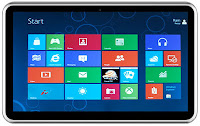
Before using one of these operating systems, there is a good friend of his understanding of all shortcomings and advantages of the latest Windows 8 operating system, here I will discuss a bit of advantages and disadvantages ofWindows 8.
Excellence:
1. Optimize for a touch screen
Windows 8, interface who has been dubbed the Metro is really optimized for a touch interface with an existing Windows Phone.
2. support the ARM chip
Windows 8 supports devices that use the infrastructure of the ARM chip. It is expected to extend the reach of Windows 8 tablet at the arena, considering most tablets in circulation currently wearing the ARM chip.
3. a short boot time
Boot Windows 8 in demo only takes place in 8 seconds. A much shorter time than booting in earlier versions of Windows.
4. Windows 8 do not need to upgrade PC
Microsoft says computers that can run Windows 7 can also run Windows 8 so that users do not have to upgrade your PC. According to Microsoft, Intel Atom processor and 1 GB of RAM is sufficient for running this OS
5. Store Windows application Store
Windows 8 will have its own application store called Windows Store. Windows Store provides a wide range of applications optimized for Windows 8.
6. support of NFC (Near Field Communications)
Windows 8 will support the NFC, a technology that use among others for financial transactions. Windows 8 Tablet wearing any likely will automatically include this feature.
Weaknesses:
1. overlapping Metro UI and Aero UI.
Developers find the existence of constantly switching between tile-based Metro UI and glassy Aero UI. It is judged to be reasonable and very confusing. Switching from application and desktop application is very hard to do.
2. There is no option to change the tiles become icons.
The size of the tiles to the smallest, it is still too large. When would we install many applications then this screen will look chaotic Metro.
3. difficult to switch between screens.
The absence of Alt-Tab function, such as when working with the desktop and keyboard to switch from one app to another app that is probably the thing that is very difficult. Instead, Windows 8 Metro UI we cannot use a pointer or finder to put a screen on the left side and drag. It sounds very trivial, but the problem will appear when we work with many applications. There is no quick and easy way to switch between applications. If moving the mouse towards the left then an icon will pops up. And if not then we have to right click it a few times or try again.
4. Metro multitasking.
If the application uses PAL Metro (for tablets) in Windows 8, the screen will display the two applications are lined up. For beginners it will not be a big problem. However for the advanced user, multitasking capabilities with Metro just for the two applications is a fatal weakness.
5. Metro.
Metro can indeed work well on tablets but the UI is not compatible if used on the desktop. Hard to do for a friend who uses a Notebook. So that by default Windows 8 might not be booting to the Metro UI. In other words Microsoft needs to provide the kill-switch to shut down the Metro UI.
6. Flash content on the Tablet PC.
It turns out Microsoft deliberately make Windows 8 does not support Flash content on the Tablet PC. The reason Microsoft is doing this is to save battery the Tablet. Moreover, it also can protect the privacy of our Tablets and increase security. This is because in some applications and other electronic devices, the use of Flash content thus cause data damage or crash.
Maybe it used to be that I can create all of your info right, may be useful.
Thursday, September 25, 2014
Samsung Galaxy Tab 3 8 0 Specification Review and Manual
In the 3rd quarter of 2013, Samsung will release their new tablet and its named as Galaxy Tab 3 8.0. This tablet support for GSM voice communication, SMS, and MMS. This smartphone use Android OS, v4.2.2 (Jelly Bean) as the operating system. In this post, today we provide the unofficial preliminary specification of Samsung Galaxy Tab 3 8.0.

Some features that included by Samsung mobile in the Samsung Galaxy Tab 3 8.0 including data connection speed that can reach up to 42 Mbps, 5 MP camera, GPS, browser that support for HTML5 document. To know more detail specification and feature of Galaxy Tab 3 8.0, you can read the specification table below.
| GENERAL INFO | |
|---|---|
| 2G network | GSM 850 / 900 / 1800 / 1900 |
| 3G network | HSDPA 850 / 900 / 1900 / 2100 |
| Announced | - |
| Status | Exp. release 2013, Q3 |
| SIZE | |
|---|---|
| Dimensions | 209.3 x 122.2 x 7 mm (8.24 x 4.81 x 0.28 in) |
| Weight | - |
| DISPLAY | |
|---|---|
| Type | Capacitive touchscreen, 16M colors |
| Size | 800 x 1280 pixels, 8.0 inches (~189 ppi pixel density) |
| Features | Multitouch support |
| SOUND | |
|---|---|
| Alert types | Vibration, MP3 ringtones |
| Loudspeaker | Yes, with stereo speakers |
| 3.5 mm jack | Yes |
| MEMORY | |
|---|---|
| Phone book | - |
| Call records | - |
| Internal | 8/16 GB, 1.5 GB RAM |
| Card slot | microSD, up to 64 GB |
| DATA | |
|---|---|
| GPRS | Yes |
| EDGE | Yes |
| 3G | HSDPA, 42 Mbps; HSUPA, 5.76 Mbps |
| WLAN | Wi-Fi 802.11 a/b/g/n, dual-band, Wi-Fi hotspot |
| Bluetooth | Yes, v4.0 with A2DP |
| Infra Red Port | - |
| USB | Yes, v2.0 |
| CAMERA | |
|---|---|
| Primary | 5 MP, 2592х1944 pixels, autofocus, LED flash |
| Features | Geo-tagging, touch focus, face detection |
| Video | Yes |
| Secondary | Yes, 1.3 MP |
| FEATURES | |
|---|---|
| OS | Android OS, v4.2.2 (Jelly Bean) |
| CPU | Dual-core 1.5 GHz |
| Messaging | SMS(threaded view), MMS, Email, Push Email, IM |
| Browser | HTML5 |
| Radio | - |
| Games | - |
| Colors | White |
| GPS | Yes, with A-GPS support |
| Java | Yes, via Java MIDP emulator |
| Other features | SNS integration MP4/DivX/Xvid/FLV/MKV/H.264/H.263 player MP3/WAV/eAAC+/Flac player Organizer Image/video editor Document viewer Google Search, Maps, Gmail, YouTube, Calendar, Google Talk, Picasa Voice memo/dial Predictive text input (Swype) |
| BATTERY | |
|---|---|
| Type | Non-removable Li-Ion 4450 mAh battery |
| Stand-by | - |
| Talk time | - |
| Music Play | - |
Friday, September 19, 2014
iOS 7 Vs Android 4 2 Vs Windows Phone 8 Vs Blackberry 10
While there are still mixed reactions on iOS 7 which comes with an all new design, let’s check out a detailed comparison table which gives you a detailed insight on where each of the OS stands. While some say that iOS is an explicit copy of Windows Phone OS as well as from Android’s Jellybean OS, it has become tough for Apple to give out clarification.

With Google keenly looking at the iOS 7, it seems like the next version of Android will surely be different from what we saw till now. Rumors are doing the rounds that the next version of Android will also be supporting the low end devices. In recent Android OS version, Jellybean 4.1 – 4.2.2 didn’t see many changes in terms of UI /UX and almost looked same.
iOS 7 | Android 4.2 | Windows Phone 8 | BlackBerry 10 |
| Control Center | Varies by Manufacturer | No Settings Menu | Access to System Settings is Possible |
| Notification center | Detailed notifications | Live tile badges | BlackBerry Hub, badges |
| Multitasking preview | Recently Used List | Multitasking preview | Active Frames grid |
| Surfaced camera modes | Varies by Android skin | Third-party lenses | Video, Time Shift modes |
| Photos grouped by years, location | Albums, other filters | Albums, date | Albums, recent |
| Shared photo stream | Select Android Devices have it | Share one by one | Share one by one |
| Peer-to-peer sharing (AirDrop) | Android Beam (NFC) | Tap + Share (NFC) | NFC sharing |
| Unified browser bar | Yes | Yes | Yes |
| Personalized radio/discovery | Google Play Music All Access | Nokia Music | Third-party app |
| Voice access to system settings | Samsung’s S Voice | No systems access | No systems access |
| Automatic app updates | Update All & Individual App Update option | ‘Update all’ option | Individual |
| Password-protected reset | No | No | No |
| In-dash integration (iOS for cars) | Driving mode/S Drive | Nokia Drive | Third-party apps |
| iCloud Like Service | No | No | No |
While the iTunes Radio is Free for all service, Google has launched the All Access Music Service which comes with the subscription service which costs $10. Nokia Music too is a free service but only is limited to Windows Phones.
So, currently there are 4 Operating Systems which are ruling the charts which includes iOS, Android, Blackberry and Windows Phone 8. OS 7 today makes a big splash when it comes to its refined interface design and a smaller splash when it comes to its new feature set. Do let us know your thoughts on which one is your current favorite OS in the comments section below.
Monday, September 15, 2014
Samsung Galaxy Mega 5 8 I9150 Specification Review
This Samsung cell phone also known as Samsung Galaxy Mega I9152 with Dual SIM card slot. This phone support for dual GSM online. This phone support for 2G and 3G network, it was announced on 2013, April and the plan, it will be released on 2013, May. For the operating system, it has use the latest Android OS v4.2.2 (Jelly Bean). Here you can know the Samsung Galaxy Mega 5.8 I9150 closer because we will provide the specification review for your buying guide.
Body, Display, and Sound
On the body, Samsung Galaxy Mega 5.8 I9150 has dimensions of 162.6 x 82.4 x 9 mm with weight about 182 g. For the display, it use TFT Capacitive touchscreen with resolution up to 540 x 960 pixels and the screen wide is 5.8 inches. In this part, Samsung give TouchWiz UI feature and it also support for multitouch action. On sound area, you can use your favorite MP3 songs for your own ringing tone, in addition, you can also use a WAV file format as a ringtone. This phone also equipped with loudspeaker to listen to the music loudly without using a headphones or headset, but if you want to use a head phones, it also complement with a 3.5 mm audio jack.
Memory, Data, Camera
Samsung Galaxy Mega 5.8 I9150 has a large space internal memory, it has 8 GB disk space. If you still need more spaces, you can use an external memory card with microSD card with size up to 64 GB, I think its large enough to store your data to the mobile phone. The system performance is supported by 1.5 GB of RAM. On data connection, Samsung Galaxy Mega I9150 has a complete connection features. Besides GPRS and EDGE, you can connected to the internet via 3G network with maximum speed that can be reached on HSDPA up to 21 Mbps. Another way to get connected to the internet is via WiFi feature. To exchange data with another gadgets like computer, laptop, or even another smartphone and Bluetooth headphones, you can use Bluetooth, it has complement with Bluetooth v4.0 with A2DP, LE. You can also use microUSB port to make a connection with a computer or laptop. To capture your important moments, Samsung Galaxy I9150 Mega equipped with a good camera with 8 MP and the maximum resolution that can be reached is up to 3264 x 2448 pixels. There are many features which offered by this camera including Geo-tagging, touch focus, face and smile detection, HDR. Besides the main camera, Galaxy Mega I9150 also equipped with 1.9 MP secondary camera.
Another features
Like mentioned above that the Samsung Galaxy Mega I9150 use Android OS v4.2.2 (Jelly Bean), this OS supported by dual-core 1.4 GHz CPU. Another features that offered by this Samsung smartphone including browser that support for HTML5 documents, GPS, Java support and multimedia player. For the battery, it use li-Ion battery with capacity of 2600 mAH.
Wednesday, September 10, 2014
Windows 8 Can be Download For This Site
Windows 8 Can be Download For This Site - Microsofts latest operating system, namely Windows 8, now can be enjoyed to the official. Users can download it directly from the internet.
operating system (OS) can be obtained through the web site www.windowsupgradeoffer.com.
Find and download opened in conjunction with the launch of Windows 8 were conducted simultaneously on Friday (10/26/2012). Lodging in Asia, the announcement of the launch of Windows 8 was conducted in Singapore, Thursday (10/25/2012).
operating system (OS) can be obtained through the web site www.windowsupgradeoffer.com.
Find and download opened in conjunction with the launch of Windows 8 were conducted simultaneously on Friday (10/26/2012). Lodging in Asia, the announcement of the launch of Windows 8 was conducted in Singapore, Thursday (10/25/2012).
Andreas said that Windows 8 installation can be done by migrating from a previous version of the OS or a single installation of a non-OS. OS Migration purchased prior to June 2012 are priced 39.99 dollars. This applies to the migration of all versions of Windows prior to Windows 8 Pro.
The migration to OS purchased starting July 2012 price is 15 U.S. dollars. This offer is valid until January 31, 2013.
"For Windows 8 Pro retail version, which features a DVD and instructions, are sold at a price of 69.99 dollars," said Andreas.
Windows 8 operating system, which is made for desktop computers and tablet PCs, consists of three variants, namely Windows 8, Windows 8 Pro, and Windows RT.
Windows 8 and Windows 8 Pro does not come with Microsoft Office applications and are intended for devices with x86 and x64 architecture processors. The Windows RT is equipped with Microsoft Office applications (Word, Excel, PowerPoint, and OneNote, without Outlook) and bundled (pre-installed) with a computer or tablet ARM processor architecture.
Meanwhile, Andreas also said that Microsoft will discontinue support and updates for Windows XP in April 2014. Site Wikipedia mentions, OS 11-year-old will be "retired" on 8 April 2014.
According to Andreas, until now users of Windows XP is still quite a lot. From 1.2 billion Windows users in the world, about 45 percent of them are still using Windows XP. Microsoft provides users the opportunity to upgrade the version of Windows XP, Vista, or Windows 7 into Windows 8 Pro version.
The migration to OS purchased starting July 2012 price is 15 U.S. dollars. This offer is valid until January 31, 2013.
"For Windows 8 Pro retail version, which features a DVD and instructions, are sold at a price of 69.99 dollars," said Andreas.
Windows 8 operating system, which is made for desktop computers and tablet PCs, consists of three variants, namely Windows 8, Windows 8 Pro, and Windows RT.
Windows 8 and Windows 8 Pro does not come with Microsoft Office applications and are intended for devices with x86 and x64 architecture processors. The Windows RT is equipped with Microsoft Office applications (Word, Excel, PowerPoint, and OneNote, without Outlook) and bundled (pre-installed) with a computer or tablet ARM processor architecture.
Meanwhile, Andreas also said that Microsoft will discontinue support and updates for Windows XP in April 2014. Site Wikipedia mentions, OS 11-year-old will be "retired" on 8 April 2014.
According to Andreas, until now users of Windows XP is still quite a lot. From 1.2 billion Windows users in the world, about 45 percent of them are still using Windows XP. Microsoft provides users the opportunity to upgrade the version of Windows XP, Vista, or Windows 7 into Windows 8 Pro version.
Saturday, August 30, 2014
Verizon Announce Nokia Lumia 822 Windows Phone 8
Nokia and Verizon Announce Nokia Lumia 822 Windows Phone 8 - One of Nokias flagship mobile operating system Windows Phone 8 will be presented in exclusive or to one of the major U.S. carriers, namely AT & T are likely to be at present in the early years but the phone is not a Nokia Lumia 820 but a windows mobile phone 8 just announced by the party named Nokia Lumia 822 which is the Verizon version of the device.
Mobile Nokia Lumia 822 comes with Nokia Drive coupled with navigation features to the map of the United States as such is the direction and the lens of the city, transit applications, and also some applications such as camera contained therein Shoot Smart, Cinemagraph, Panorama and creative studios.
Mobile Nokia Lumia 822 comes with Nokia Drive coupled with navigation features to the map of the United States as such is the direction and the lens of the city, transit applications, and also some applications such as camera contained therein Shoot Smart, Cinemagraph, Panorama and creative studios.
To take advantage of 4G LTE connectivity performance is better and faster then the Nokia provide services free of ads, log in to the Nokia music streaming service on mobile phones is the Nokia Lumia 822, there is also a CDMA network and Verizon LTE. Besides feature specifications of the Nokia Lumia 822 is another feature Dual GSM SIM, 8MP camera equipped with Carl Zeiss lens, has a screen measuring 4.3 "WVGA AMOLED display with ClearBlack display and is powered by a dual-core Krait.
Different Casing can be placed on the back of the phone Lumia 822 is useful for improving the appearance of this phone and also has other functions such as useful for charging the device. But unfortunately there is no official information from Nokia regarding the sales price and availability of this phone outside of the United States. We wait for further information regarding the Nokia 822s.
![Nokia]()
Different Casing can be placed on the back of the phone Lumia 822 is useful for improving the appearance of this phone and also has other functions such as useful for charging the device. But unfortunately there is no official information from Nokia regarding the sales price and availability of this phone outside of the United States. We wait for further information regarding the Nokia 822s.

Wednesday, August 27, 2014
Burn Data Files In Windows 8 With Ashampoo Burning Studio Free
Burn Data & Files In Windows 8 With Ashampoo Burning Studio Free - Now Microsoft has removed the Windows DVD Maker from their latest OS, and for Windows 8 users you are required to install other software to be able to do Burn data CD, DVD or Blu-ray disc. You can find lots of free software to Burn data & file for Windows, but not all of them can be used in Windows 8.
![Burn]()
For you who are looking for free software to burn data & file in Windows 8 could try processing Ashampoo Burning Studio 6 free full already compatible with Windows 8 and includes all the features you need from a software burner.
Ashampoo Burning Studio 6 Free can you use to burn files and folders, backup or restore files and folders, create audio CDs, create MP3 discs, WMA discs, rip audio CDs, burn or music files, burn DVD video from the folder containing the video file DVD, and much more.
Download Ashampoo Burning Studio 6 Free.
Ashampoo Burning Studio 6 Free can you use to burn files and folders, backup or restore files and folders, create audio CDs, create MP3 discs, WMA discs, rip audio CDs, burn or music files, burn DVD video from the folder containing the video file DVD, and much more.
Download Ashampoo Burning Studio 6 Free.
Tuesday, August 26, 2014
Use Mountain Lion Skin Pack for Windows 8 and 7 Download Link
One way to transform and beautify the look of the OS is installed on your PC using a Skin Pack. This time we found a Skin pack that you can use to change the look of Windows 7 & 8 CP to be similar to the Mountain Lion OSX.
Mountain Lion Skin Pack will change the look of your windows OS like OSX, but on Windows maish bebeapa the original look like in the explorer, the kesulurah skin pack is suitable for you who like the look of OSX. Skin Pack is as mentioned above is available for users of Windows 7 and Windows 8 Consumer Preview and support for the 32-bit and 64 bit
Mountain Lion Skin Pack will change the look of your windows OS like OSX, but on Windows maish bebeapa the original look like in the explorer, the kesulurah skin pack is suitable for you who like the look of OSX. Skin Pack is as mentioned above is available for users of Windows 7 and Windows 8 Consumer Preview and support for the 32-bit and 64 bit

If you are interested in the following download link that can be used:
Subscribe to:
Posts (Atom)