Showing posts with label Lucid. Show all posts
Showing posts with label Lucid. Show all posts
Thursday, November 13, 2014
Verizon now offers LG Lucid 3
.png)
Remember the South Korean consumer electronics manufacturers upcoming Android smartphone that leaked last month for the United States carrier, Verizon Wireless? Well the handset is now official from the Big Red Stateside carrier and is an affordable middle ranged smartphone.
The Black color option of the phone is now available from Verizon to customers for free if your ready to sign the agreements on a two years contract. And if you ont prefer to own the device off-contract, then the 4G LTE phone will cost you 299 United States Dollars unlocked. There is also Verizon Edge plan, where you can own the newly announced LG Lucid 3 for $12.49 per-month.
Talking about the smartphones design, the new LG Lucid 3 features really slim and narrow bezels on the front aside the display, glossy plastic back with dotted pattern and also bringing a dedicated home button like other Samsung made Galaxy phones.
LG Lucid 3 will come out of the box with a 1.2GHz Quad-Core processor, 4.7-inches qHD TFT screen of 960 x 540 resolution display in protection of Corning Gorilla Glass 3, eight gigabytes of internal mass storage (expandable via microSD card slot), one gigabyte of Random Access Memory (RAM), five megapixels main camera on the back with LED flash light, 4G LTE network support with Bluetooth 4.0 connections plus other LG attributes like KnockOn, Knock Code, Guest Mode, EasyHome, and more on board with a 2,440mAh powered battery and runs Androids version 4.4.2 KitKat with LGs own customization on top.
Source: Verizon

Sunday, September 28, 2014
How to Factory Reset Hard Reset LG Lucid 2
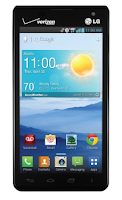
Restoring the default settings or factory reset your LG Lucid 2 will delete all your existing files. It is recommended to backup your important files on your computer before attempting to reset your device.
The steps below are the instructions on how to factory reset your LG Lucid 2:
Step 1. On your HomeLcd, tap on MENU icon.
Step 2. Select Settings, then select Backup & Reset option.
Step 3. Under Personal Data, tap on Factory Data Reset.
Step 4. Read warning carefully before tapping the Reset phone.
Step 5. If you want to proceed in resetting your device, tap on Erase Everything to confirm the Factory Reset.
Now, you just need to wait while your device is resetting. It should reboot itself and you will have a new start on your LG Lucid 2.
If your LG Lucid 2 is unresponsive, then you may need to do the Hard Reset.
- Press and hold the Power button/Lock Key and Volume Down Key at the same time.
- Hold these buttons until you see the Factory Hard Reset.
- Press the Power Key continue or the Volume Keys to cancel.
- Press the Power Key again to confirm the factory reset, or the Volume Keys to cancel.
- Wait for a few minutes while your phone performing the hard reset. It will turn on in a while.
Subscribe to:
Posts (Atom)